We remain fully operational. Our teams are working around the clock to ensure your deliveries continue safely.

下载应用程序


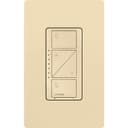


💡 Light up your life smarter, not harder.
The Lutron Caseta Original Smart Dimmer Switch (Ivory) offers professional-grade smart lighting control compatible with up to 150W dimmable LED and 600W incandescent bulbs. It requires the Lutron Smart Hub for voice and app integration, supports wireless 3-way setups with Pico remotes, and requires no neutral wire—making it ideal for modern and legacy homes alike. With seamless compatibility across major smart home platforms and customizable scheduling, it transforms everyday lighting into an intelligent, energy-saving experience.


| ASIN | B00KLAXFK6 |
| Actuator Type | N.A |
| Best Sellers Rank | #1,235 in Tools & Home Improvement ( See Top 100 in Tools & Home Improvement ) #4 in Dimmer Switches |
| Brand | Lutron |
| Brand Name | Lutron |
| Circuit Type | 3-way |
| Color | Ivory |
| Connectivity Protocol | N.A |
| Connector Type | Hard Wired |
| Contact Material | Brass |
| Contact Type | Normally Closed |
| Control Method | Voice |
| Controller Type | Amazon Alexa w/Lutron Smart Hub |
| Current Rating | 1.25 Amps |
| Customer Reviews | 4.7 out of 5 stars 4,985 Reviews |
| Global Trade Identification Number | 00784276072007 |
| Included Components | Dimmer Switch |
| International Protection Rating | UL |
| Item Dimensions | 1.13 x 2.93 x 4.69 inches |
| Item Type Name | Electrical Distribution Switcher |
| Lower Temperature Rating | 32 Degrees Fahrenheit |
| Manufacturer | Lutron |
| Material Type | Metal, Plastic |
| Model | PD-6WCL-IV |
| Mounting Type | Ceiling Mount,Wall Mount |
| Number of Items | 1 |
| Number of Positions | 4 |
| Operating Voltage | 120 Volts |
| Operation Mode | ON-OFF |
| Specification Met | UL |
| Switch Type | Dimmer Switch |
| Terminal | N.a |
| UPC | 784276072007 |
| Unit Count | 1.0 Count |
| Upper Temperature Rating | 104 Degrees Fahrenheit |
| Wattage | 150 watts |
D**Y
Excellent with Lutron's Smart Bridge
We recently picked up a Logitech Home Control remote, and decided to try out some of these Caseta dimmers since they're compatible with the Logitech remotes. Initially I just got one of these switch/remote combos; but, we liked it so much that we ended up replacing most of the switches downstairs. Interestingly enough, it looks like there have been at least 2 or 3 revisions of these switches - and Lutron seems to be fixing some of the usability issues. For example, the wall switch itself is completely flat; so, it takes some practice to turn it on in the dark. The newer revision has small 'nubs' on the switch (kind of like braille bumps) so it's easier to find the correct button in the dark. The Pico remote includes a large button in the middle of the switch that's very convenient - and I'm not sure why the wall switches don't have that same feature since it makes the remote a lot more usable in the dark... Aside from some minor revision differences, here are the things we like about these: 1) The dimmers work perfectly with our G7 LED bulbs . The dimming range is excellent, and the switches are adjustable so you can actually set the minimum and maximum dimmer setting to match your bulbs. 2) The Pico remote will pair with one switch; but, if you use it with the Lutron Smart Bridge , you can actually pair a single Pico remote with as many switches as you want. That makes it possible to do some cool things - like turning off all the lights downstairs with a wall-mounted Pico remote. 3) Once again, when paired with the Lutron Smart Bridge, it's possible to turn lights on and off on a schedule - and the schedule can even be based on the current sunrise and sunset times. This is one of the coolest features of these switches once you start messing around with it! 4) These can be controlled either individually or in groups using the Logitech Home Control remote. 5) Lutron has a very easy to understand video on their website that shows how to wire these into a 3-way switch configuration. In essence, you just remove one of the switches and replace it with the Pico remote - while the wired switch ends up working as a standard switch. The wiring only takes a few minutes and it works perfectly. I love that up always equals 'on', unlike a standard 3-way switch configuration - and the battery life on the Pico remote is supposed to be 10 years. 6) These dimmers look great. 7) The install process was easy, and the instructions and videos that Lutron provides are some of the best I've seen. Even though we like them enough to replace most of switches in our downstairs, I do have some complaints: 1) The completely flat face of the switch takes some getting used to - as I already mentioned. The revision with the small nubs does help with this, so I wish all of the ones we got had that feature. (I actually wish the switch was the same as the Pico Remote with the raised button in the center...) 2) If you want to mount the Pico remote in a 3-way configuration (which most buyers of this kit probably do), then you'll need to pick up the Pico Wallplate Bracket as well. Lutron put quite a bit of thought into this package - and I wish they had included that bracket. I'm not trying to overstate the usability issues. I reality, it's pretty quick to adjust - but just be aware that it does take some adjustment. If you're just looking for a dimmer that will work with LED and CFL lights, then there are less expensive options out there that work just as well. If, on the other hand, you're looking to combine this with either the Lutron Smart Bridge or the Logitech Home Control remote, then this is part of an excellent system! I would definitely recommend trying these out.
A**L
Great reliable switches
These are great and so versatile. They work great with HomeKit (though the hub is needed), but getting them programmed is so simple and they work seamlessly.
W**H
Not the cheapest smart light switch but they work great and look nice
I have used a number of different smart light switches and these are my favorite. They are the most reliable. I have been using them since they came out about 10 years ago and have rarely had any issues. They work great with all types of bulbs. They look nice. Easy to install, if they fit in the box (most of my boxes are small metal ones that have nails through them so there isn't much room or tucking the wire in nicely so i have to replace the box usually). Range is not as far as Wi-Fi, but in my 2600 sq-ft home it has not been an issue. Yeah you need a hub, but if that is what it takes to make them this reliable, it's well worth it. They are a bit pricey, but they work great. The App is easy to use. It doesn't have a ton of features, but it integrates easily with Alexa, Google/Nest and IFTTT. I guess it works well with Apple Home as well. These are handy if don't have a neutral, most other smart switches need a neutral or work off Bluetooth and the range on most of them us pretty poor and they also require an interface module.
D**Y
Expensive but reliable
These switches are expensive and lack a neutral. However, I have tried a bunch of different others, and none have been nearly as reliable as the Lutron ones. Every other brand eventually disconnects from my zigbee network. These are much more solid in their connectivity. I guess you get what you paid for.
J**E
Transformed A "Dumb" 1985 Home Into A Modern Lighting Experience
I got hooked into home automation after solving a few very basic quality of life issues that dramatically improved a few problems in our home. I debated heavily between smart bulbs and smart switches before I purchased anything. After trialing these Lutron Casetas, I'm going (almost) all-in with Lutron! I own a 1985 home and was interested in modernizing the general lighting experience as one of my next projects. Lutron has an excellent reputation in the smart switching market and after using them, it's for a very good reason. These switches are a perfect addition where you want manual push-button light dimming capabilities. They can act as "fast" on/off, graduated dimming to specific levels or in my case, can be highly automated with external home automation platforms. They can also be used in 3-way applications, however, this requires the addition of a Pico remote. This makes sense to me so you don't get "smart tech fighting smart tech" in your lighting circuits. When do you want to avoid a dimming switch? In applications such as pumps, fluorescent ballasts, garbage disposals, most outdoor security lighting, locations you might use a smart bulb and ceiling fans. Basically, anything that isn't designed specifically to be electrically dimmed or lowered in voltage. These applications are better served by Lutron's on/off switches or even dumb on/off switches. The installation of these switches are fairly straight forward. You need a basic understanding of electricity, including the "load" wire and the "hot" wire. These particular Lutron switches don't require a neutral wire, but if you're going into smart switches, be aware that some models require it. I strongly recommend using Wago connectors for your retrofit, they are light years beyond traditional wire nuts. Other than this, installation is straight forward and requires only a few basic hand tools. I had a little bit of difficulty in "tight" switch boxes, but made it work as these are generally fairly slim smart switches. If you have appropriate dimming-capable bulbs, you will immediately be greeted by a super-fancy "dim-on" and slightly slower "dim-off" function when you press the on or off buttons. This is a "luxurious" experience out of the box and is one of the reasons I went Lutron. Let's talk about bulbs. If you're still pondering a smart bulb for your particular lighting application, this dimming switch might not be for you. In general, this switch will work best with a "dumb" bulb that can be properly dimmed. Smart bulbs don't handle the dimming effect properly, they aren't really "compatible" from a technology standpoint. So you really have to figure out your strategy going in and you might be better served by Lutron Aurora or Lutron's true on/off switches. Likewise, I've discovered in my installations that I needed to change some of my bulbs to ones that can be dimmed. You'll know this is the case if you have problems with "strobing" on power off or bulbs that don't fully turn off. In my case, this didn't really irk me because I'm adding dimming functions where it has never existed before. Pairing this dimming switch with the Lutron hub is crazy easy. Just press a button while you're adding the switch in the app. Likewise, I use Home Assistant as my home automation platform. Adding these switches was equally easy there. The current integration is super slick and requires very little actual effort. I have three rules for "critical infrastructure" in my home, which I'd classify lighting as exactly that. First, the technology must work intuitively, like a normal light switch would. Second, it has to work without any fancy "server smarts" or special networks in place. Lastly, it has to integrate with a home automation solution of my choice, I don't want to be forced into a particular cloud solution or app. These Lutron switches fit exactly these criteria and is part of the reason I didn't go with smart bulbs. For examples of how I use these smart dimming switches? I have motion activated lighting in my bathrooms, closets, entryway and stairwell. I no longer need to proclaim, "Turn the lights off" as I can now make that decision in an automated and unobtrusive way. I use the dimming functions to turn my bathroom lights on to heavily dimmed level during certain hours, so I'm not "blasted" by bright light if I use the bathroom at 3AM. I can keep a low power and dimmed "always on" outdoor security light, and then light everything up to full blast when my security camera's AI analysis detects a human. (No more rain or snowfall triggering a lighting "disco palace" in my outdoor lighting!) I also can much better tune the "mood" of my room lighting using scene concepts with this and other technologies. If you're in the market for smart switches, these should definitely be up for your consideration. A common complaint is that they are expensive, but they are incredibly reliable, fast and operate without any other technologies. They will add value to your home since they are true "infrastructure" and you can claim "home automation ready" should you go to sell your home. I am very glad I went the Lutron route overall and this review explains a bit of why I went "all in" with Lutron's smart switching.
J**P
One of the few smart in wall dimmers that works well. Echo integration, lacks default dimming level.
Installation is quick and easy. Setup of the smart functions is easy enough as well. I did find that the range on the smart functions to be more than adequate for my home, the setup/pairing process seems to require the switch to be closer to the Caseta bridge for the pairing process. So for some of my switches it wouldn't pair initially. Being a in wall dimmer it's not easy to get the switch closer to the bridge for pairing, it can be done by temporary mounting near the bridge. It may have been easier to relocate the bridge temporarily for the remote switches. The switch looks great and is easy enough to operate. There is remote available that allows you to add 3-way switching capability without the hassle of wiring a 3-way switch. I wish I knew that before I had our Kitchen remodeled, may have saved some on the wiring costs and allowed me to use these switches throughout the Kitchen. This switch isn't designed to be part of an existing 3-way wiring plan. (If you do want to put this smart switch in place of a 3-way switch setup, there is an interactive setup guide on Lutrons' Caseta website that walks you through converting the circuit to single pole, then you use the remote in the second location, the remote can be mounted in place of the remote switch using an inexpensive wall mount receptacle designed for this scenario). Leviton have a smart switch that has a separate wire for 3-way wiring. One downside to the in wall dimmer is that it can't be programmed with a default dimmer level, the lights come on full power when you press the on button. A little jarring first thing in the morning. The remote does have a "favorite" button which does allow for a dimming level to be set as a preset. Why Lutron gave the remote this capability, but didn't do the same for the in wall switch is baffling. Hence the 4 star rating. The Lutron Caseta integration with Amazon Echo is good. It works really well with the Echo. The "Scenes" appear to the Echo like a separate device, which may result in counter-intuitive voice commands. For example I set up a scene called "Low Light" which sets all kitchen lights at a predetermined dimming level. I have to say "turn on low light" to use the scene versus the more intuitive "Set Low Light".
G**T
Bye Bye Traditional Light Switchs, Bye Bye
I installed these switches in all of my bedrooms. These are a game changer. They are somewhat easy to install, you just plug and play, I took these from my old house when I moved into my new house. This is one of the few Lutron switches that does not require a neutral wire, which is very nice and makes installing them very easy. The directions are simple and easy to follow. If you are putting this switch on a traditional ceiling fan with the pull cord and two separate switches, I highly suggest get their fan switch as well. If you are going from traditional light switches to this one, you may also want to consider getting a new cover plate. Traditional switches uses a toggle cover plate and this one uses a rocker cover plate. If you are a person irritated by the slightest light, just be aware that the switch displays very dim green LED lights when the light is off (barely visible at night with lights off) and a much brighter one when the light is on, but hey the lights are on at that point, so what does it matter how bright the LED is anyways. This switch integrates seamlessly with Alexa (Lutron skill) and can also be controlled by a remote. It takes a bit to learn the commands to use Alexa. You need to know the name of the light you are trying to control such as "Master Bedroom Light" and then the percent you desire the light's intensity to be such as "80%" I really like these switches. They are awesome, they are amazing. I really cannot envision a world where I would not have them. Theses devices are the highlight of my smart home and I highly recommend them.
E**C
Good value and performance
Lutron Casetta is the gold standard for digital dimmer control for smart home systems. I use it with my iPhone and HomePod to control my lights. Versatile for direct touch control or via HomeKit. Buy one at a time or a pack depending on your budget. Eventually all my light switches will be this product or the standard on/off version. Requires Lutron bridge for smart home control.