We remain fully operational. Our teams are working around the clock to ensure your deliveries continue safely.

下载应用程序




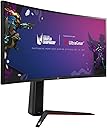


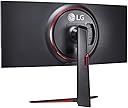



🖥️ Elevate your productivity and play — see more, do more, be more.
The LG 34GN850-B is a 34-inch ultra-wide curved monitor featuring a sharp 3440 x 1440 QHD resolution, designed for professionals and gamers who demand immersive visuals and versatile connectivity. Equipped with 3 USB 3.0 and 2 HDMI ports, it seamlessly integrates into any modern workspace. Its sleek black design and LG’s trusted innovation make it a premium choice for those who want to stay ahead in productivity and entertainment.
| ASIN | B0864GCQPL |
| Adaptive Sync | FreeSync |
| Aspect Ratio | 21:9 |
| Brand Name | LG |
| Cable Length | 464.1 Millimetres |
| Colour | Black |
| Colour Gamut Value | 0.98 |
| Compatible Devices | Cellphone |
| Contrast Ratio | 1000:1 |
| Customer Reviews | 4.5 4.5 out of 5 stars (826) |
| Display Technology | LED |
| Display Type | LED |
| EU Spare Part Availability Duration | 2 Years |
| Hardware Connectivity | USB 3.0 |
| Has Color Screen | Yes |
| Image Brightness | 400nit |
| Is Electric | Yes |
| Item Dimensions D x W x H | 22.6D x 32.3W x 12.3H centimetres |
| Item Weight | 7.6 Kilograms |
| Manufacturer | LG |
| Maximum Display Resolution | 1024 x 600 |
| Model Name | UltraGear 34GN850 |
| Model Number | 34GN850-B.AEU |
| Mounting Type | VESA Mount |
| Native Resolution | 3440 x 1.44 |
| Network Connectivity Technology | HDMI |
| Picture Quality Enhancement Technology | Nano IPS |
| Pixel Pitch | 0.276 |
| Power Consumption Size | 72 Watts |
| Product Features | Curved Screen, Tilt Adjustment |
| Product Warranty | 2 year manufacturer |
| Refresh Rate | 160 Hz |
| Resolution | QHD Ultra Wide 1440p |
| Response Time | 1 Milliseconds |
| Screen Finish Type | Curved |
| Screen Size | 34 Inches |
| Shape | Rectang |
| Specific Uses For Product | Gaming |
| Total HDMI Port | 2 |
| Total USB 3.0 Ports | 3 |
| Total USB Ports | 3 |
| Total Video Out Ports | 3 |
| Unit Count | 1.0 count |
| Viewing Angle | 178 Degrees |
| Voltage | 220 |
J**R
The monitor is one of the best investments I’ve made for both work and play. The 34" ultrawide Nano IPS display is stunning — vibrant colors, deep contrast, and excellent sharpness. It transforms gaming into a cinematic experience and dramatically improves productivity with all the extra screen real estate. I use it for everything from immersive single-player gaming to multitasking between windows while managing my home server and Docker containers. The 160Hz refresh rate and 1ms response time make fast-paced games buttery smooth, and G-SYNC compatibility ensures no tearing or stuttering. Build quality is excellent, the stand is sturdy and adjustable, and the design is clean and professional — suitable for a home office or gaming setup. The OSD menu is intuitive, and it’s easy to switch profiles or tweak settings. Whether you're a gamer, developer, or power user, this monitor offers premium performance and a serious upgrade in user experience.
D**E
This monitor is a no brainer if you're looking for a display that you can use for creative work as well as gaming. For gaming just leave the default settings as they are, and only change the refresh rate to 160Hz (it defaults to 144). After that don't forget to change the refresh rate within Windows as well. Adjust brightness to your likings/environment, and you're good to go. G-Sync was recognized out of the box, so that's a bonus. If you use this monitor for creative work as well, I found it best to use the sRGB mode, which is pretty accurate out of the box. This isn't my first 34GN850, and just like the other unit, this one as well suffers from a tiny bit of over-saturation towards red. You can tweak this within Windows if required, but I think for most (home) users this isn't really required. There was minimal light-bleed at the top left corner when using completely dark images. So minimal that I actually had to look for it. This is something that is different between the panels, so you do need a bit of luck with that. My other 34GN850 also minimally suffered from this (same corner) and was a bit more noticeable. Again, I had to look for it to notice it, so it most likely won't be something that ends up annoying you, if you even see it at all. The monitor stand is stable and reasonably easy to manage. It does take up space on your desktop, so take that into account. For that reason I wall-mounted the monitor which can be done using Vesa 100mm. The added bonus is that the red highlights on the stand won't other me anymore (not a fan of the red). The monitor is slightly curved so it will stand out a bit a the edges. It's best to use a Vesa bracket that is as flat as possible. That does introduce a tiny issue however; the included DisplayPort cable gets in the way. Using a 90-degree adapter will solve this problem. Connectivity is fine with one DisplayPort connection and two HDMI ports. There is room for two USB devices as well but throughput seems to suffer a bit, so I ended up not using it as all. It would have been nice to see a USB-C option on this monitor, but most people would probably not use this. Within this price range I think this is most likely one of the best monitors you can get. I paid €669,- for the panel which is a no-brainer. Yes, it is a lot of money, but compared to what other monitors offer you (and fail to offer you), at a higher price point, this is actually an outstanding monitor. At this price I challenge you to find anything better.
J**L
Este monitor hace notar que has invertido bien el dinero, la calidad de imagen y color son impresionantes. Yo pensaba que no iba a notar mucha diferencia, pero si, la diferencia de nota y mucho en todo. Conforme estás abriendo la caja te empiezas a dar cuenta de porque cuesta este dinero, lo primero que ves es la caja de accesorios que incluye todos los elementos necesarios para conectarlo a tu equipo, hdmi, dp, cable de datos....etc.... Luego cuando coges la peana empiezas a decir: que barbaridad....., se nota que está hecha a conciencia y que es una peana firme, fuerte y basándose en un montaje muy fácil y rápido, es muy cómodo montar todo, y sin herramientas!!. Cuando ya está montada la pantalla viene el miedo: ¿y los pixeles muertos, vagos o atacados?, directamente no tiene, he mirado minuciosamente y no he encontrado ninguno, ¿y las fugas de luz?, en mi monitor ahora mismo sin ninguna!!. Se nota cuando hay calidad en un producto, ha superado todas mis espectativas!! es un producto de muy alta calidad, lo recomiendo, rotundamente, si.
L**X
Recensione: Il LG 34GN850 UltraGear è un monitor gaming ultra-wide dalle prestazioni eccezionali. La risoluzione QuadHD UltraWide curva 21:9 e la tecnologia LED NanoIPS assicurano un'esperienza di gioco immersiva con immagini nitide e dettagliate e una gamma cromatica estesa. Il design curvo dello schermo contribuisce a rendere l'esperienza di gioco ancora più coinvolgente e immersiva. Il monitor ha una velocità di aggiornamento di base di 144 Hz, che può essere overclockata fino a 160 Hz per ottenere prestazioni ancora più fluide. Il tempo di risposta di 1 ms rende la riproduzione delle immagini senza ritardi e la tecnologia G-Sync di Nvidia elimina lo sfarfallio e i ritardi per un'esperienza di gioco fluida e senza intoppi. Queste caratteristiche fanno del LG 34GN850 UltraGear un'ottima scelta per i gamer che cercano un monitor gaming di alta qualità. Il monitor LG 34GN850 UltraGear offre anche un'ampia gamma di funzionalità di personalizzazione. Dispone di porte HDMI, DisplayPort, USB-C e USB, il che lo rende facile da collegare a qualsiasi dispositivo di gioco. Inoltre, la regolazione dell'altezza, l'inclinazione e la rotazione del monitor consente di adattarlo alle esigenze personali di gioco. Una delle caratteristiche più interessanti del monitor LG 34GN850 UltraGear è la possibilità di overclocking. Il monitor può essere overclockato fino a 160 Hz, il che lo rende ancora più veloce e reattivo. Questa funzionalità di overclocking rende il monitor LG 34GN850 UltraGear una scelta popolare tra i gamer più esigenti che cercano di ottenere il massimo dalle prestazioni del loro monitor gaming. In conclusione, se stai cercando un monitor gaming ultra-wide dalle prestazioni di alto livello e con funzionalità di overclocking, il LG 34GN850 UltraGear è sicuramente una scelta da considerare. Pro: . Risoluzione QuadHD UltraWide curva 21:9 e tecnologia LED NanoIPS per immagini nitide e dettagliate . Design curvo dello schermo per un'esperienza di gioco immersiva . Velocità di aggiornamento di 144 Hz (overclockabile fino a 160 Hz) e tempo di risposta di 1 ms per riproduzione fluida e senza problemi delle immagini . Tecnologia G-Sync di Nvidia che elimina lo sfarfallio e i ritardi per un'esperienza di gioco ancora più fluida Ampia gamma di porte (HDMI, DisplayPort, USB-C e USB) e funzionalità di personalizzazione, tra cui la regolazione dell'altezza, dell'inclinazione e della rotazione del monitor Contro: . Prezzo elevato rispetto ad altri monitor gaming della stessa categoria . Il supporto del monitor può risultare instabile in determinate configurazioni, richiedendo il posizionamento su una superficie solida e stabile
T**R
Les points forts : Résolution QHD et taux de rafraîchissement élevé : La combinaison d'une résolution QHD (3440 x 1440) et d'un taux de rafraîchissement de 144 Hz (pouvant atteindre 160 Hz en overclocking) offre une image fluide et détaillée, idéale pour les jeux vidéo rapides et exigeants. Couleurs vives et fidèles : La couverture de 98% de l'espace colorimétrique DCI-P3 garantit des couleurs éclatantes et précises, ce qui est particulièrement apprécié pour le montage vidéo, la retouche photo ou le graphisme. Luminosité élevée et HDR : La luminosité de 400 cd/m² et la certification DisplayHDR 400 offrent un excellent contraste et des noirs profonds, pour une expérience visuelle immersive. Temps de réponse rapide : Le temps de réponse de 1 ms élimine quasiment le flou de mouvement, ce qui est essentiel pour les jeux vidéo compétitifs. Connectique complète : Le moniteur dispose de toutes les connectiques nécessaires pour répondre à vos besoins, avec notamment deux ports HDMI 2.0, un DisplayPort 1.4 et plusieurs ports USB 3.0. Fonctionnalités gaming avancées : Les technologies AMD FreeSync Premium et NVIDIA Gsync compatible assurent une synchronisation parfaite entre l'image et le taux de rafraîchissement de la carte graphique, éliminant les déchirures d'écran et les saccades. Ergonomie : La possibilité d'incliner et de régler en hauteur le moniteur permet de trouver la position de travail la plus confortable. Quelques points à considérer : Prix : Les moniteurs haut de gamme avec de telles caractéristiques ont généralement un prix élevé. Taille : Le format 21:9 et la taille de l'écran peuvent ne pas convenir à tous les espaces de travail. Consommation électrique : Les moniteurs avec un rétroéclairage LED consomment plus d'énergie que les modèles plus anciens. En conclusion : Ce moniteur est un excellent choix pour les utilisateurs exigeants en matière de qualité d'image et de performances. Il est particulièrement adapté aux gamers, aux graphistes, aux vidéastes et à tous ceux qui souhaitent profiter d'une expérience visuelle immersive. Si vous êtes prêt à investir dans un écran haut de gamme, ce modèle ne vous décevra pas.
TrustPilot
2 周前
3 周前