We remain fully operational. Our teams are working around the clock to ensure your deliveries continue safely.

下载应用程序


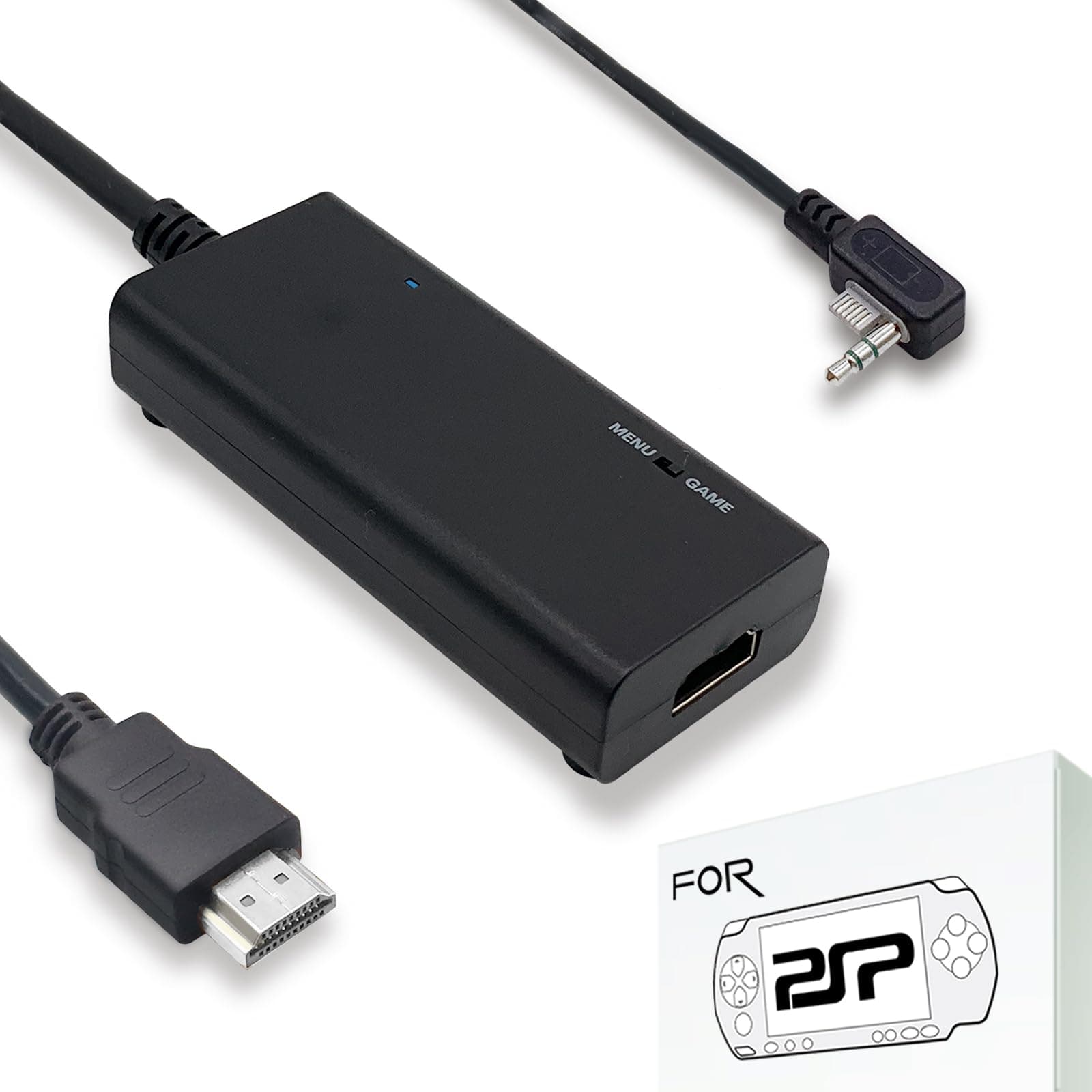
🎮 Level up your retro gaming—big screen, zero compromise!
This HDMI cable converts and upscales the analog output of PSP 2000 and 3000 consoles to crisp 720p digital HDMI signals, enabling full-screen display on modern HDTVs and monitors with minimal latency. Featuring a plug-and-play detachable design, it supports extended HDMI cables and includes a USB power supply. Perfect for nostalgic gamers seeking to relive classic PSP titles with enhanced image quality and seamless compatibility, backed by a one-year free replacement warranty and dedicated customer support.
| ASIN | B07SCXD68H |
| Best Sellers Rank | #6,248 in Video Games ( See Top 100 in Video Games ) #7 in Sony PSP Cables |
| Brand Name | LEVELHIKE |
| Cable Type | HDMI |
| Color | Black |
| Compatible Devices | Monitor, PlayStation, Projector, Television |
| Compatible Phone Models | No Compatible Phone Models |
| Connector Gender | Male-to-Female |
| Connector Type | HDMI, Micro USB |
| Customer Package Type | Standard Packaging |
| Customer Reviews | 4.3 4.3 out of 5 stars (678) |
| Indoor Outdoor Usage | Indoor, Outdoor |
| Item Shape | Round |
| Item Weight | 0.3 Kilograms |
| Manufacturer | LevelHike |
| Maximum Voltage | 5 Volts (DC) |
| Model | LevelHike [unique identifier] |
| Number of Items | 1 |
| Number of Pins | 24 |
| Other Special Features of the Product | Portable |
| UPC | 743815983228 |
| Unit Count | 1.0 Count |
S**R
Exceptional product, exceptional service.
For the price this is an excellent quality product. It works exactly as described and is very simple to use. When I received this item, unfortunately there was some hardware defect, however after corresponding with customer service the issue was promptly resolved and all within a week before Christmas, no less! Top of the line service and response time. A more detailed review: Replacement worked well on the TV. The setup is simple: just ensure the HDMI and USB power supply are plugged into the tv and converter box, then enable the display via display settings on the psp itself(note: must be done each time you wish to switch to the big screen. Refrain from putting your PSP into sleep mode while HDMI in use, as you will have to reactivate the display from the PSP menu if you do.) For lower resolution games such as JRPGs or SRPGs, the graphics are flawless, and beautiful to see on the big screen. For higher resolution games with a lot of moving parts such as Dissidia Final Fantasy, Kingdom Hearts Birth By Sleep, or FF7: Crisis Core, there may be a bit of flicker or distortion in the colors. To mitigate this, ensure your PSP is fully charged and unplugged from the PSP's power supply. I can't recommend this product enough. If you're late to the PSP party, pick one up. If you have a PSP just laying around somewhere, dust it off, pick one of these up, kick back, and enjoy your old favorites on the big screen!
B**E
Works perfectly!
I've seen some reviews stating that cables such as this one simply don't work. For starters, make sure it has power via the included USB cable, but also that the box on the cable lights up. Other than that, the cable is very simple to set up, and transmits audio and video perfectly and input is 1:1 with the console, as it should be. The biggest thing about this cable is that it fills the whole screen with the console's output image, making it far superior to an analog A/V cable, which I have also tested. All in all, a great cable that I can recommend for those looking to play their PSP on the big screen!
X**G
Probably the only good way to get HDMI video out of a PSP
For starters the PSP only outputs analog component video. So there's going to be a loss of quality converting to HDMI, and the picture IS a little blurry. But it's not bad. Don't expect a pixel perfect image. But what you do get is good brightness, good colors, and good image stability. No flickering or dropout, the levels are set just right so you don't have to mess with your TV's image settings. It has a switch to zoom up the center of the display to help give a more of a full-screen instead of a letterboxed picture. This works pretty well. It does make the blurriness worse, but since you are scaling a blurry source image it's kind of expected. Overall I like this thing. I wish the PSP had digital video output, but it doesn't, so this is as good as it gets. For the price point I'd say it's a solid deal.
J**W
Good quality but you may want to use a PS3 controller to make it less awkward.
Thankfully there was a simple guide in the reviews about how to set this up. I used this to play Persona 3 Portable on my tv and so far there are no complaints. The quality was very good like it almost felt like I was playing the ps2 version of the game. I used the HDMI cable from my PS5 because all the HDMI ports on my tv were taken. However, I never noticed how awkward the analog stick on the psp 3000 is. It's passable when playing the psp on its own but it's super awkward to use the analog stick while focusing on the tv. I heard there's a way to use a ps3 controller on the psp but I forgot how. It'll make playing psp games on the tv less awkward for sure.
G**8
A Must-Own for PSP-2000 & PSP-3000 Owners
(Video Review for this posted on GamersXtreme.org, as the file size was too large) When the PSP entered the market back in Japan late 2004 and early 2005 in North America, it served as Sony’s first gaming handheld device that was set to compete with Nintendo’s handheld dominance. While it never sold near the numbers of Nintendo’s handheld, the device itself was still excellent and one worth owning. Throughout the years, the PSP received model revisions: the original PSP-1000, slim PSP-2000, slim and more vibrant LCD PSP-3000, and the all-digital PSP Go. When the PSP-2000 model released, all further models received a feature that let users output their PSPs to TVs to play their games on. There were composite and component cables released for them, but in our current technological standpoint, those inputs are becoming more difficult to find on TVs. The folks over at LevelHike have been on a mission to provide HDMI solutions for retro gaming consoles, and the PSP is one they put out recently. They kindly provided us a review unit so let’s give this a look. The PSP HDMI adapter is very simple to use. Simply plug the device into the AV out port of the PSP, plug the micro USB adapter into the device to power it up, and plug the HDMI cable from the device into the TV, and then go to the PSP’s display settings to output the device to the TV…and that’s it. Oh, and you can also just hold the display button on the PSP device itself for a few seconds to switch the output to your TV as well. You’ll notice the device itself has a Menu and Game toggle switch, which lets you basically change the aspect ratio to either keep its native output resolution, or fill the whole TV. Now, the device is not meant to upscale the visuals by any means, so jagged edges will be present and more noticeable than on the portable screen itself, but that’s no different than if you used the official Sony component or composite cables. Throughout my use of the device, everything worked really well. There was no noticeable lag at all, and visually everything appeared to look identical to the output the official Sony cables. Even audio is handled quite well and nothing sounded off or jarring by any means. Even during video capture, the visuals and audio were on-point. Now, the device retails for $29.99, which is reasonable for what it is intended to do. The ability to play PSP games on the TV (without a PlayStation TV device, which is fetching for a fairly high price currently) is always one that intrigued me since the PSP-2000 model released. Seeing that the PSP got this HDMI adapter is pretty great. Just remember, that if you only have the PSP-1000 model or PSP Go, this will not work. This is strictly for the PSP-2000 and 3000 models. I know this review is probably on the short side, but I really don’t have any gripes with it after testing it out the past few months. The build quality of the device is pretty solid, and it does exactly what it’s meant to do quite well. LevelHike may not be a popular known brand like Hyperkin or Pound, but this is the second unit we have reviewed of theirs (the Sega Saturn HDMI being the first) and I’m pleasantly surprised at the quality of the their product. Whether you want to play your PSP games on the TV, capture footage, or stream games, this is a must-have for any PSP enthusiast.
P**L
Defective - signal cuts out regularly.
Bought this a little while back and it sat in a drawer until now. First time I tried to use it, the signal output is not consistent. Regardless if it's plugged right into a TV or into a capture device, the signal does not display for longer than a few seconds at a time before cutting to black for a few seconds making it impossible to use. I would have returned it if I noticed sooner. If you buy one, test it right away!!
J**J
En pleno 2024 consegui un psp nuevo y como en una memoria tengo un monton de peliculas UMD en formato ISO lo compre para conectarlo a una tv y poder disfrutar de todo el contenido multimedia de esta gran consola.
T**A
Worked for my psp
S**K
Le produit fonctionne très bien mais la qualité n'est pas la ... On paie plus de 100€ pour un produit qui donne la même qualité que son équivalent en composite RCA ... Certes cette version en HDMI règle le problème de l'image en jeu qui ne remplie que 50% de l'écran mais la il ne remplie que 80% de l'écran, c'est mieux que rien mais sur les images du produit on vois bien que l'image remplie bien 100% de l'écran et en HD, et non en qualité SD. Bien dommage de payer aussi cher juste pour résoudre le problème de la dimension de l'image en jeu ... Pour rappel, l'image qui sort de se produit est en SD et non HD !
お**よ
最初に一般的な利用方法であれば何も問題なかったですが、後述する方法ではどこかに問題がありうまく動作しなかったです。 pspからc875へ接続しパソコン画面を確認したところうまく映らず、c875からパススルーではしっかり映っていた。 c875の方レビューを見ると同製品とは関係ないが似たような症状を報告している方がいました。 本製品との相性が悪いのか写真のようになっていた。(左が録画ソフト、右がパススルー)
小**之
nice!!!
TrustPilot
1 个月前
4天前