We remain fully operational. Our teams are working around the clock to ensure your deliveries continue safely.

下载应用程序


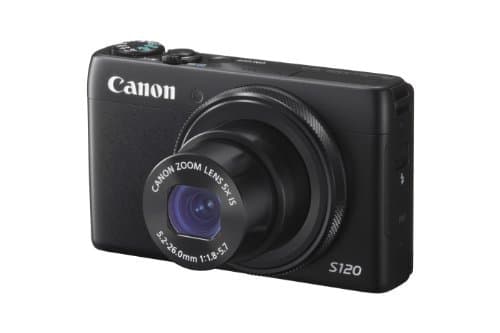




📷 Elevate your everyday moments with pro-level clarity and instant sharing — because your story deserves the spotlight.
The Canon PowerShot S120 is a compact digital camera featuring a 12.1MP high-sensitivity CMOS sensor paired with the DIGIC 6 processor, enabling exceptional low-light photography and fast autofocus. It offers 5x optical zoom with a bright f/1.8 lens, 1080p/60fps Full HD video recording, and a sharp 3.0-inch capacitive touchscreen LCD. Built-in Wi-Fi allows seamless wireless sharing to smartphones and social platforms. Designed for professionals and enthusiasts seeking portability without sacrificing image quality or creative control.
| ASIN | B00EFILNV8 |
| Age Range Description | All Ages |
| Aperture modes | Av |
| Are Batteries Included | Yes |
| Aspect Ratio | 4:3 |
| Auto Focus Technology | Center, Continuous, Contrast Detection, Face Detection, Live View, Multi-area, Selective single-point, Single, Touch, Tracking |
| Autofocus | Yes |
| Autofocus Points | 9 |
| Best Sellers Rank | #68,466 in Electronics ( See Top 100 in Electronics ) #560 in Digital Point & Shoot Cameras |
| Bit Depth | 12 Bit |
| Brand | Canon |
| Built-In Media | CB-2LY Battery Charger for Canon NB-6L Lithium-Ion Battery, NB-6LH Lithium-Ion Battery Pack (3.7V, 1,060mAh), One Year Limited One Year Limited Warranty Card, PowerShot S120 Point-and-Shoot Camera, WS-DC11 Wrist Strap |
| Camera Flash | Built-In |
| Camera Lens | 120 Mm |
| Color | Black |
| Compatible Devices | Canon EF |
| Compatible Mountings | Canon EF |
| Connectivity Technology | HDMI, USB |
| Continuous Shooting | 12.1 |
| Crop Mode | 16:9 |
| Customer Reviews | 4.1 4.1 out of 5 stars (258) |
| Digital Scene Transition | zoom |
| Digital Zoom | 4 |
| Digital-Still | No |
| Display Fixture Type | Fixed |
| Display Resolution Maximum | 922000 |
| Display Type | LCD |
| Dots Per Screen | 922000 |
| Effective Still Resolution | 12.1 |
| Expanded ISO Minimum | 80 |
| Exposure Control | Aperture priority AE, Automatic, Creative Filters, Custom, Manual, Movie, Program AE, Scene, Shutter priority AE |
| File Format | JPEG, RAW |
| Flash Memory Bus Interface Type | SD |
| Flash Memory Installed Size | 9.7 |
| Flash Memory Speed Class | 10 |
| Flash Memory Type | SD/SDHC/SDXC |
| Flash Memory UHS Speed Class | U1 |
| Flash Memory Video Speed Class | 10 |
| Flash Modes | Auto, On, Off, Slow Synch, Rear Curtain Synch |
| Flash Sync Speed | slower than 1/200 |
| Focal Length Description | 120 millimeters |
| Focus Features | AiAF TTL |
| Focus Mode | Manual Focus (MF) |
| Focus Type | Manual Focus |
| Form Factor | Compact |
| Global Trade Identification Number | 00138032289916 |
| HDMI Type | Type C Mini HDMI |
| Hardware Interface | USB |
| Has Color Screen | Yes |
| Image Capture Type | Stills |
| Image stabilization | Optical |
| Item Weight | 7.7 Ounces |
| JPEG Quality Level | Basic, Fine, Normal |
| Lens Construction | prime |
| Lens Correction Type | aspherical |
| Lens Type | Fixed-zoom |
| Manufacturer | Canon Cameras US |
| Maximum Aperture | 5.7 f |
| Maximum Focal Length | 120 Millimeters |
| Maximum Image Size | 4000 Pixels |
| Maximum Shutter Speed | 1/2000 Seconds |
| Metering Methods | Multi, Center-weighted, Spot |
| Minimum Focal Length | 24 Millimeters |
| Minimum Shutter Speed | 15 seconds |
| Model Name | Canon PowerShot S120 |
| Model Number | 8407B001 |
| Model Series | PowerShot S120 |
| Movie Mode | Yes |
| Night vision | No |
| Number of Diaphragm Blades | 7 |
| Optical Zoom | 5 x |
| Photo Sensor Resolution | 12.1 MP |
| Photo Sensor Size | 1/1.7-inch |
| Real Angle Of View | 75 Degrees |
| Remote Included | No |
| Screen Size | 3 Inches |
| Self Timer | 10 Seconds |
| Sensor Type | CMOS |
| Series Number | 120 |
| Shooting Modes | Underwater |
| Skill Level | Professional |
| Special Feature | Live View |
| Specific Uses For Product | Photography |
| Supported Image Format | JPEG, RAW |
| Total Still Resolution | 12.1 MP |
| Total USB 2.0 Ports | 1 |
| Total USB Ports | 1 |
| Total Video Out Ports | 1 |
| Touch Screen Type | Yes |
| UPC | 138032289916 013803228991 |
| Video Capture Format | MPEG-4, H.264 |
| Video Output | HDMI |
| Video Resolution | FHD 1080p |
| Viewfinder | Electronic |
| White Balance Settings | Auto, Custom |
| Wireless Technology | Yes |
| Write Speed | 12 fps |
| Zoom | Optical Zoom |
C**E
Fast, portable, and love the wifi feature!
I've had the Canon S90 for the last five years and it truly served me well. I was in the market for a new portable camera with RAW and after comparing the Sony RX100 to the Canon S120, I decided to go with the S120. I was hesitant to go with the S120 because it looked exactly like the S90 and I wanted something different but I've discovered that the S120 is a completely different beast! Here are the things that have made this upgrade a worthy investment: 1. High Resolution screen: The S120 has a 922,000 dot 3 inch LCD screen, almost double the S90's. Colors are richer and details are sharper! 2. Built-In Wifi: I like to share lots of photos and photo collages on facebook and instagram. The S120 allows me to import high-resolution photos into my iPhone with ease. My instagram uploads never looked better (no more grainy iPhone selfies)! I had to snoop around to figure things out as the instruction manual and online blogs offered nothing. If you want simple instructions, I've provided them below. 3. Faster overall usage: The shutter speed is fast and the camera's burst feature is awesome (9.4 fps). 4. HDR mode: The HDR mode is very useful for scenic, high contrast scenes when you want all the details and shadow areas to come forth! 5. Wide Angle: The focal length is 5.2–26.0mm (or 35mm film equivalent: 24–120mm). This is slightly wider than the S90 and the Sony RX100. It may not seem like much but it makes a big difference when shooting various scenes. 6. Versatile: I've clumsily dropped the camera twice already (once on asphalt and once in a restaurant) and despite some cosmetic scruffs, the camera works great. Downsides: The battery life on the S120 is definitely shorter than the S90. Be sure to buy a couple of generic batteries for the S90/S120 and carry them with you. How to Import Photos into Your Smartphone Do not use Canon ImageGateway, you will waste your time with a registration system that doesn't even work (as of April 2014). 1. To start importing photos into your smartphone, you've first got to set it up. Do this at home on your wireless network. Connect your smartphone to your wireless network. Connect your camera to your wireless network. Take a few photos, go into playback mode on your S120, press up on the spin dial, select "Add a Device," and then follow the prompts to add your smartphone onto your S120. 2. Go to the Apple AppStore and download an app called "Canon CW." 3. Once your smartphone is setup and recognized by your S120 camera, you have two options to import photos. The first option (at home on your wireless network): Go to playback mode on your S120, press up on the spin dial, select the smartphone icon, and the camera will begin searching for the smartphone on your wireless network. Turn your smartphone on (make sure it's connected to your wireless network) and open the "Canon CW" app (your camera will say "Start dedicated app on target device"). The app should recognize your camera and allow you to preview the photos. Select only the photos you want to import. If the app doesn't recognize the camera, try quitting the app and open it up again. The second option (on the road with no wireless network): Go to playback mode on your S120, press up on the spin dial, select the smartphone icon, and the camera will create a wireless access point. Turn your smartphone on, go to your network settings, and then select the access point that your camera has created. Then open up the "Canon CW" app and it's the same as above. I hope this helps someone. I spent hours before I figured this out on my own.
R**N
Superb Pocket Camera
I am a longtime user of the PowerShot S100, but my wife decided to expropriate my S100, so here I am with the S120. I will begin with the end -- I believe that the S120 is possibly the very best choice for a true pocket camera. The first thing that the user will notice about the S120 is the fit and finish. This camera is built very nicely and with reasonable sturdiness. Ergonomically it is very good. Most users can be taking pictures within 60 seconds of taking the camera out of the box. Of course, studying the manual and the built-in menus reveals a host of sophisticated features beyond the taking of simple snapshots. One thing that Canon did with the S120 that is different than my old excellent S100 was to put a switch on the side of the camera to raise the flash. If this switch is disabled, the camera will not select flash no matter what. I actually preferred the S100 system where the user selected the flash setting in the menu and then the camera used the flash based upon that settings and the composition of the shot. I'll grant that the S120 system gives the user even more control, which I suppose was the idea. But it is one more setting to have to remember. The S120 seems to be a solid improvement over the S100 in most respects. The main thing that I like about both of these cameras, the S120 in particular, is that it pretty much lets you shoot the way that you want to. I mainly shoot in Program mode with this camera, but the camera also offers an AUTO mode, which sets absolutely everything, as well as a manual, aperture-priority, and speed priority setting. These options are quite impressive for a camera of this class, and yes I do sometimes use them, especially the speed-priority setting. The camera has various other special settings for various types of shooting and for shooting to achieve various effects. The lens on this camera is very good for a camera of this class. It is the equivalent of a 24-120mm lens on a 35mm camera. The lens is relatively fast, meaning that when shooting in non-zoom situations, i.e. portraits, the lens is an F/1.8 lens, which is able to shoot, for example, portrait type shots without flash under some lighting conditions. (Many lenses require flash for pretty much any indoor scenario in order to achieve a quality photograph.) Canon reports that this is an F/1.8-F/5.7 lens -- which means that as you zoom the lens it will require more light. Nonetheless, these are impressive specifications for a lens of this class. In practice I find that this camera takes very good pictures and it is ideal for vacations, industrial and business uses, and all situations where you do not want to have to carry a full Single Lens Reflex camera. This camera features a generous 3.0 inch capacitive touch LCD on the back, and this is the nerve center of the camera. You will use this LCD to compose shots, review the shots, and set most menu settings. Like all modern cameras, this camera is controlled by menus that you access via the LCD screen. Mostly the menus are intuitive and most users will quickly become familiar with them, especially users who have used other electronic cameras in the past. Years ago most cameras of this class had an optical focusing window, but no more. The user must compose shots using the rear LCD. This LCD is superior to many and as good as any LCDs on the market for this purpose, but I prefer an optical focusing window. Alas, pretty much all camera manufacturers have decided that composing via the LCD is the way to go. Mostly this works fine, and indoor this works superbly, but there are times out in bright sun venues when this becomes tricky. On minor nit -- As with the S100 and S110, Canon relentlessly refuses to put a protective lip or bezel around the edge of the LCD, so if you set the camera down on the LCD you stand a good chance of scratching it. This can be largely solved by buying one of the after-market screen protectors. One of the really nice advances on the S120 is that you can move the focusing square to anywhere in the composition shot simply by placing your finger on the capacitance LCD. In the field this makes for very fast composition, and I like this feature a lot. WI FI CONNECTION! The S120 connects easily to your iPhone by use of the Canon Window App, which is available in the App Store. It will also connect to your computer. SINCE THE CANON INSTRUCTIONS TO DO THIS FOR A WINDOWS COMPUTER ARE WRONG, HERE IS HOW TO DO IT. First follow the Canon directions to connect the S120 to your network. Then, for a Windows computer, follow the Canon directions and begin trying to connect to your computer. (Here is the step Canon omitted) THEN, go into Control Panel/Devices and Printers and select "Add a Device". Your Canon S-120 will show as a new device. As soon as you add it you will be able to see the folders on your S-120's SD card. I hope this helps someone; it took me a long time to figure this out. By the way, ensure that if you have two networks from your router, i.e. a 2.4Ghz and a 5.0 Ghz, your computer needs to be on the 2.4 Ghz network. Once you set your S-120 to be connected to your Windows computer as I just explained, it connects very very easily. Works like a dream. At the end of the day the purpose of this, or any, camera is to take great photographs. You can do that with the S120. It has a very good lens for this class of camera and it will produce excellent images under most conditions. No, this camera is not the best choice for shooting indoor sports, for example -- the combination of low light and high speed subjects really necessitates a full Single Lens Reflex camera with a high-dollar lens. Similarly, an SLR will do a better job on fast-moving wildlife. But for portraits, landscape shots, and many other shots that people typically take on vacations or with family and whatnot, this camera will deliver excellent images and is a great choice. RJB.
I**E
Great Camera, But...
This is an excellent camera! It takes great pictures and the settings are simple and easy to use. It takes fantastic low light photos, which was very important to me. Also very important to me are the small size, so it can fit easily in a pocket, and the very solid construction, since I am notoriously rough on cameras. So why not 5 stars? I decided on this camera, in part for its WiFi capabilities, and as it turns out, the WiFi functions are completely worthless. I'm reasonably tech savvy, and I have spent countless hours trying to make the WiFi function with my Android phone and my Windows desktop and laptop computers. Maybe it works, and I just can't figure it out, but nothing should be that difficult. Canon has made a very solid camera here, but they really dropped the ball with the WiFi functions.
D**Y
Light weight but does a great job. Perfect for travelling when you are trying to be compact with luggage.
M**Z
Prior to this camera, I was using a Canon S95. It's a great travelling camera. Takes superb photos, fits into your back pocket and has all the features that you need whether you take automatic photos or if you want more manual control. I also used the camera in an underwater housing for underwater photography. Unfortunately, my housing leaked (lesson learned - don't go with the Canon brand housing). I've had many very favourable comments on photos.
TrustPilot
1天前
1 个月前