We remain fully operational. Our teams are working around the clock to ensure your deliveries continue safely.

下载应用程序





⚡ Power your productivity with speed and style!
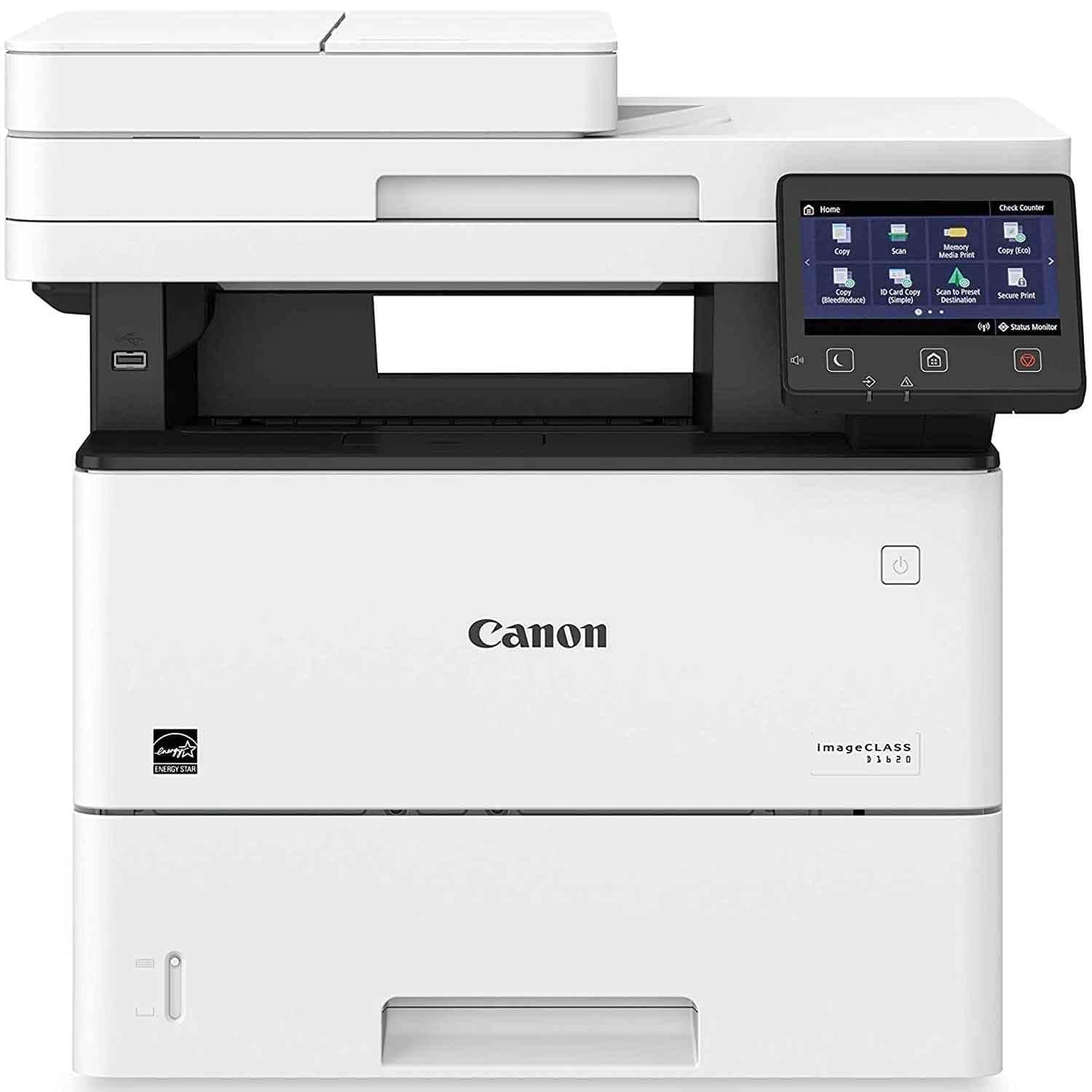
The Canon imageCLASS D1620 is a high-performance monochrome laser printer designed for small to mid-size workgroups. It delivers rapid 45 ppm printing, supports up to 2,300 sheets of paper, and features automatic duplex printing. Its 5-inch color touchscreen offers an intuitive, customizable interface, while wireless and Ethernet connectivity ensure seamless integration across devices. Backed by a 3-year limited warranty, this reliable multifunction printer combines scanning, copying, and efficient document handling to keep your office running smoothly.


| ASIN | B07N22V2L5 |
| Additional Printer Functions | Copy |
| B&W Pages per Minute | 45 |
| Best Sellers Rank | #37,094 in Office Products ( See Top 100 in Office Products ) #49 in Laser Computer Printers |
| Brand | Canon |
| Built-In Media | Canon Genuine Toner 121 (5,000-page yield), D1620 Printer, Documentation, Power Cord |
| Color | White |
| Compatible Devices | Laptops, PC |
| Control Method | Touch |
| Controller Type | Vera |
| Customer Reviews | 4.3 4.3 out of 5 stars (450) |
| Display Type | LCD |
| Dual-sided printing | Yes |
| Duplex | Automatic |
| EU Spare Part Availability Duration | 3 Years |
| Global Trade Identification Number | 00013803311662 |
| Hardware Interface | Ethernet, USB |
| Ink Color | Black |
| Item Dimensions D x W x H | 18.3"D x 19.5"W x 17.8"H |
| Item Type Name | Laser Printer |
| Item Weight | 41.9 Pounds |
| Manufacturer | Canon USA (Lasers) |
| Maximum Copy Resolution Black and White | 600 dpi |
| Maximum Copy Speed Black and White | 45 ppm |
| Maximum Media Size | 8.5 x 14 inch |
| Maximum Print Resolution Black and White | 600 x 600 dpi |
| Maximum Sheet Capacity | 2300 |
| Model Name | imageCLASS D |
| Model Number | 2223C024AA |
| Model Series | D |
| Number of Trays | 1 |
| Other Special Features of the Product | Auto Document Feeder, Auto-Duplex, Touch Screen |
| Output sheet capacity | 150 |
| Paper Size | 8.50 x 5.50, 8.50 x 14, 4.80 x 9.50, 8.50 x 11, 7.25 x 10.50, 3.37 x 9, 4.30 x 8.60, 3 x 5 Inches |
| Print media | Paper (plain) |
| Printer Connectivity Type | Networkable, USB, Wireless |
| Printer Output Type | Monochrome |
| Printer Type | Laser |
| Resolution | 600 x 600 |
| Scanner Type | Flatbed |
| Specific Uses For Product | Office |
| Total USB 2.0 Ports | 3 |
| Total Usb Ports | 3 |
| UPC | 013803311662 |
| Unit Count | 1.0 Count |
| Warranty Description | 3 year Exchange / Carry In |
| Warranty Type | limited |
E**2
Great Printer over 6 years of use so far
It’s 2025 I’ve had this since 2019 Wife uses it for homeschooling my kids it’s in constant weekly use no issues works great crazy since then it’s was $249 that almost doubled in price but don’t hesitate for normal home use and ink lasts long great investment
S**S
Plug in & use!
*Super easy installation. It does NOT require you to subscribe to anything. Just plug and use. *Prints super fast speed *Wireless capability is awesome and easy to connect. The printer is plugged into the wall in a completely different room than where the internet modem is located. *Wirelessly connects to every computer in the house with ease *Set-up took less than a second. *Highly recommend if you want a Black & White user friendly printer. Who needs a color printer all the time? In the description it clearly states this is a Monochrome printer which means it prints only in Black & White. Those who rated this low for it being a Black & White printer make no sense. We live in a society of people who don't read, nor know vocabulary, I guess. Buy it! You will be happy.
C**N
Great printer. Holds up well over time. Easy to use.
We have had one of these printers in our auto shop for 2+ years. No problems at all. Prints over 100 sheets every day. It was easy to program and use with multiple computers over wifi. All functions work well including copying, scanning, and printing. We do not use the fax. We like it so much that we recently bought the same printer for the back office. Would recommend highly.
T**O
No telephone port ! Confusing setup. Tel support from Canon was prompt but insufficient
Setup very confusing -comes with DVD and manual for computer experts (and I am very knowledgeable). Had to go online to download drivers and hundreds of choices of what to download and set up. Finally I was able to scan and print via wireless. Then it started to print on the back page of whatever paper put in. Also the bypass multi tray only works if setup for that tray only; unlike most other printers, it does not sense paper is now in bypass tray so print from here. Very , very frustrating. It does seem fast. Scans go straight to a file very quickly. Printing from app is pretty good. The touchscreen is pretty good but my adult size finger did not fit to arrow to right side - used pencil eraser tip. Touchscreen keeps popping up asking for what type of paper despite always using letter size,20lb size and having set this multiple times on printer preferences on the printer itself and must also deal with printer settings on windows. So much wasted time. And once there is an error in printing, the Print Queue cannot be cancelled! (even after cancel, task mgr to end task, and rebooting both printer and laptop! I called a canon for business showroom in town and no help on these matter. Was thinking about another Canon but could not get a simple answer whether bypass tray sensor should work and which ones have tel port for faxline. Looking elsewhere besides Canon to replace this one.
M**T
Lots of Printer, Poor Instruction
This printer was purchased for our small HR department to scan/print sensitive personal documentation (use case), set up by an IT professional. Unboxing and initial set-up was very easy. There is a sticker near the USB port on the side of the printer advising not to plug the device in until the software (which is included) is installed. Installation was smooth, printer added as a device in Windows without any headache or unnecessarily bloated software (HP I'm looking at you). Prints great, scans to computer great. Seemingly going great. HR wants to be able to scan to e-mail. Should be easy enough; this printer has that capability. Add the user's e-mail to address book: check. Go to scan from main menu: check. Selected scan to e-mail: check. Select user's address from book: check. Press "Scan Color": che- nope! "Scan to e-mail/i-fax has not been configured in Remote UI." "Ok no problem let me open the manual that comes with the printer and investigate Remote UI. Oh, huh, there is literally nothing in the included manual which discusses how to set up Remote UI." That's ok, some instructions are missing, no big deal, I know what a web management interface is. Enable wireless networking, go to look at Network in settings. "System Manager ID and Pin required." Not in the manual. Neat. Ok cool so go online, find the default System Manager ID and Pin with Google search. Things are already irritatingly elaborate without instruction but so far so good on execution. Use the ID/Pin, inspect IPv4 settings, get IP address, type into URL to initialize Remote UI: "Remote UI cannot be accessed because no Remote UI pin or System Manager ID and Pin have been set up." Oh boy! Go refer to manual again: surprise surprise, NOTHING about this or about how to configure Remote UI. At this point our hero in IT is getting frustrated. Go online, dig up more elaborate manual for this model which includes instructions about configuring Remote UI pin. Somewhat dismayed at two things in particular: 1. This information ought to have been included in the manual which comes in the box with the damn printer 2. Configuring Remote UI was not intuitive. It was nested within another menu option under Device Maintenance --> Licenses, and not even called what the error message would indicate it would be We are almost through with this saga. So, after setting a pin for a user to log into Remote UI, logging into Remote UI through that user (not the System Manager ID/Pin, which were already defaulted out of box), and going into any and all settings for scanning/faxing, knowing that the settings are as configured as they ever will be (and updating the printer's firmware for good measure), I go back to the menu on the printer itself: Go to scan from main menu: check. Selected scan to e-mail: check. Select user's address from address book: check. Press "Scan Color": che- nooooope again you dumb sonnuva bitch! "Scan to e-mail/i-fax has not been configured in Remote UI." Same error, moments after stepping through every damned setting Remote UI has available, after pulling teeth to even get into the stupid thing. I'm certain there is a way to get this to work. I'm sure after I call Canon customer support they will say "but of course sir, go to X and tweak Y then click Z," it will be a perfectly pleasant experience and it will eventually work. I called Canon at 1130am EST yesterday, and was told "high call volumes mean longer than usual wait times, you can get a call-back or wait on the line. Estimated wait time 30 minutes." This is fine, very standard; problematic, though, because I am interrupting HR's day to be plopped at their desk. Shall I have them call me back in my office, then run to HR's, interrupt whatever they're doing, and troubleshoot this unintuitive set-up which wasn't documented properly in the manual? Or perhaps I roll the dice on that 30-minute wait and hope HR isn't back from lunch before this nonsense is sorted? Bottom line: this printer was easy to set up, reasonably priced, functions very well. However, scan-to-email is not some complex feature that should have this much hair-pulling to get working. The only reason it has been nightmarish, I'll add, is that the documentation from Canon was absolute dogshit. I was blown away by how little was included to help a user work with this. Even knowing precisely what Remote UI was, the error messages were/are of no help in ascertaining how to resolve the errors. Even finding the complete manual online did not make this much easier, and even after doing everything possible to situate this thing, I'm being left with the exact same error. You more or less HAVE to call Canon support for this unless you have the time to poke at it and just go with the throw-spaghetti approach, which eventually works, but neither HR nor the IT department here has the time to be wasting on unintuitive, undocumented printer error messages. Especially when a technical support call is, at minimum, 30 minutes of holding or an unhelpful callback. Final score: 80/100 -- strong device, reliable company, big fan of Canon (for most things). And hey: if you don't need scan-to-email and just scan-to-device, the thing works immediately. EZPZ, hands off. You want to scan-to-email though? Well, sorry kid, you have to configure something nonspecific inside of a Remote UI, the access of which is hidden from you behind counterintuitive menus and unfurnished documentation, and once you configure everything under the sun in this Remote UI, you get the same error message (and it's no more specific). Come on Canon, geez.