We remain fully operational. Our teams are working around the clock to ensure your deliveries continue safely.

下载应用程序


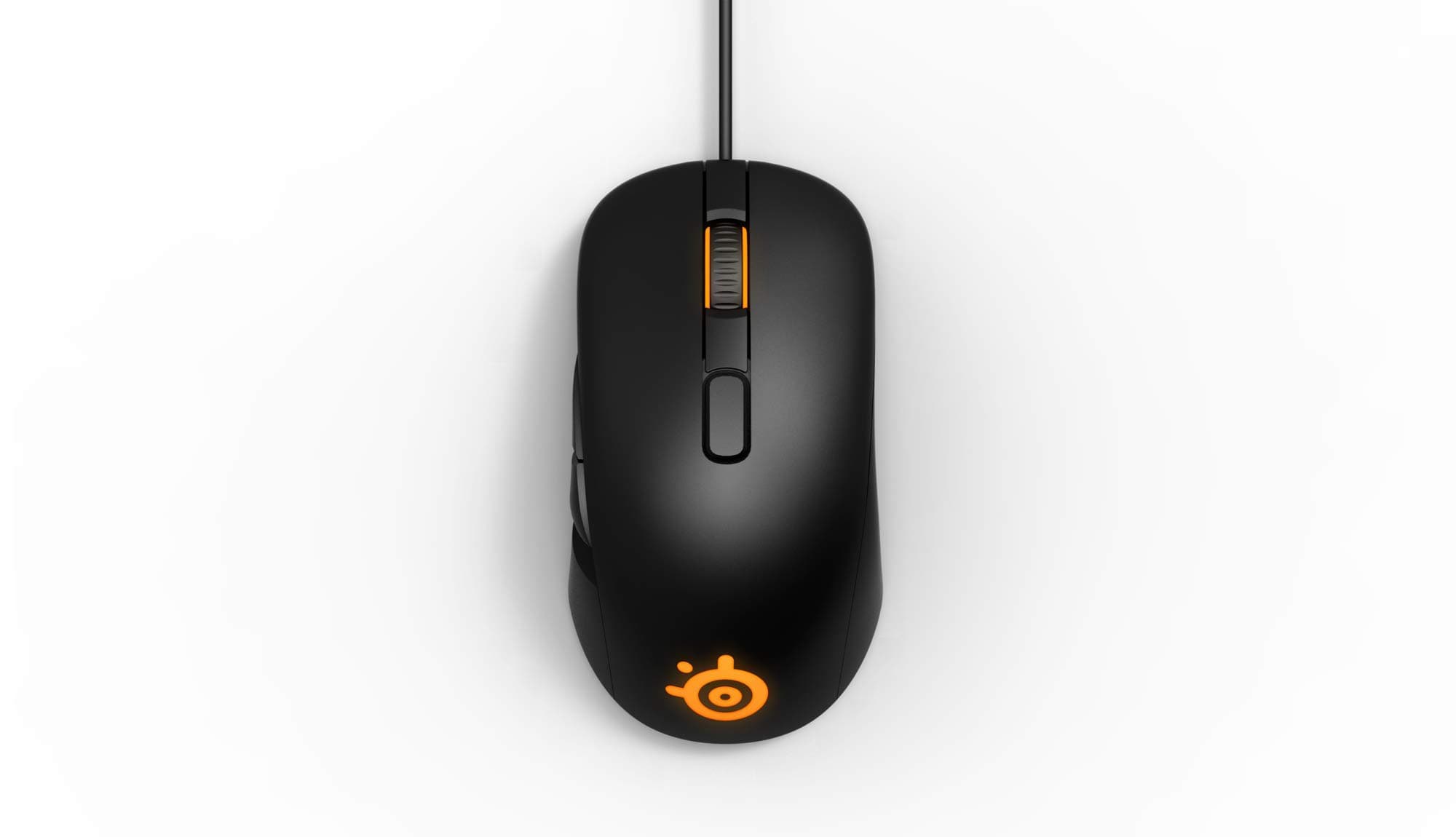

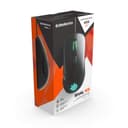
🎮 Elevate your game with precision and style — don’t just play, own the arena!
The SteelSeries Rival 105 Optical Gaming Mouse combines a custom 4000 CPI S3059-SS sensor with ultra-durable 20-million click Omron switches in a lightweight, ergonomic design. Featuring dual-zone Prism RGB lighting and six programmable buttons, it offers professional-grade performance and customizable control for right-handed gamers seeking precision and comfort.
| ASIN | B07LDNTN1L |
| Antenna Location | Gaming |
| Are Batteries Included? | No |
| Are Batteries Required | No |
| Battery Average Life | 12 Months |
| Best Sellers Rank | #879,115 in Electronics ( See Top 100 in Electronics ) #876 in Gaming Mice |
| Box Contents | Gaming Mouse |
| Brand | SteelSeries |
| Brand Name | SteelSeries |
| Button Quantity | 3 |
| Colour | Black |
| Compatible Devices | Laptop, Personal Computer, Smartphone, Tablet |
| Customer Reviews | 4.0 out of 5 stars 10,872 Reviews |
| Enclosure Material | Rubber |
| Hand Orientation | Right Hand |
| Hardware Platform | Laptop, Personal Computer |
| Importer Contact Information | Acro Engineering Company, 522/1 Jonapur Village , Dew Delhi - 110020 |
| Item Type Name | Mouse |
| Item Weight Unit of Measure | 540 Grams |
| Manufacturer | SteelSeries, SteelSeries Dirch Passers Alle` 27, 5th Floor DK-2000 Frederiksberg, Denmark |
| Manufacturer Contact Information | SteelSeries Dirch Passers Alle` 27, 5th Floor DK-2000 Frederiksberg, Denmark |
| Model Name | Rival 105 |
| Model Number | 62415 |
| Mouse Maximum Sensitivity | 4000 Dots per Inch |
| Movement Detection | Optical |
| Movement Detection Technology | Optical |
| Number of Buttons | 3 |
| Operating System | Linux, Windows 7, Windows XP |
| Packer Contact Information | SteelSeries Dirch Passers Alle` 27, 5th Floor DK-2000 Frederiksberg, Denmark |
| Product Features | Ergonomic Design, Lightweight |
| Special Feature | Ergonomic Design, Lightweight |
| Style Name | Rival 105 |
| Theme | Video Game |
| Unit Count | 1 Count |
J**™
Best mouse i've used, period.
I've had/have a bunch of gaming-centric mice in my time. I currently use an Alienware pro, a Razer Mamba, a G600 and a Naga trinity exclusively for WoW. Enter, the Rival 500. The TL;DR version is: It has the benefits of all the mice, and the cons of none (except maybe to some: the bulkiness, which personally i kinda LIKE) I'm only going to cover the things that aren't already covered multiple times by every damn review and comparison you will read/see about the R500. The weight / bulkiness: Some people find this a negative factor, people like me find it a positive. It adds a total sense of 'quality' to an item the heavier and well-built it is. It's human nature to feel that way. For those of you pansies who like the featherweight types, the "heavy" weight is easily made up for by the plethora of mouse sensitivity options. It even has a decelerate function, which helps slow your mouse down, even you are at 160000000 DPI it brings the mouse to a silky smooth halt depending on how you set it up. i mean wtf that is epic for any mouse to have. Macros: Damn easy to set up when i compare it to the interface of the rest of the mice. Especially coughcoughrazercough Vibrations? yes please: When I'm not busy setting timers for the vibrations and promptly shoving the mouse up my behind waiting for them to kick in, I use it to tell me when my cooldown or wtvr is complete. less fun than option 1, but more function. You can assign 10, yes TEN different type of vibrations/tactile feedback for EACH button upon press, upon release, upon the coming of armageddon, you choose! Useless stuff that no one cares or should care about: You can remove the back rubber thingy. and make your own thingy! WHAT! yes hold on while i buy a damn 3d printer so i can shove my name into something that is angled towards the damn table surface and literally no one can ever read. There are some uh... removable? pads under the mouse. well they look removable, but theyre stuck. with glue. and they dont stick back after your excited ass tries to half remove them thinking its a weight adjuster. Spoiler alert: ITS NOT. It does not have "hypershift" functionality. (you cant set 2 actions to the same key by using a 2nd modifier key) Compared to the naga, its "smoother", has more grip/control and the buttons are easier to not screw up. You will never waste your ulti on that creep ever again. Compared to the AW, well AW is mostly for the looks so nvm im going to skip this one and save AW some embarrassment.. Compared to the G600, its a toughie. the G600 is a hell of a mouse. The modifier on the right of the g600 has saved me tons of re-programming and has added a lot of ease. Thats a big +1 for the G600. I can't honestly say the rival 500 is BETTER, though i can say they are on par. Whats puts the 500 back up on par is the easy of the side buttons. It is just hella easy moving your thumb more of an up,down,left,right for your actions than the G600's more linear, harder to memorize sort of thumb movement. The mamba is better in some cases. mainly, if you do work on the same computer that you game. The mamba is such an "effortless" mouse. has all the right buttons in all the right places and hypershift is a godsend if you use it for work. When it comes down to gaming the 500 kicks it in the butt tho. Long story short, want a good mouse that covers all the angles? get the rival 500. Want another mouse? Get that instead, always wondering "ermergerd i couldve just moved my thumb up down left right instead of this bullsh**" and then kill yourself. kbye.
U**C
GOOD mouse
its really good, accurate sensor, decent LED and a GREAT shape, upgraded from g102 cause that mouse started double clicking. this mouse gives you 30million clicks, sensor wise both feels same, now lets see if i run into any problem, ill update ya Update 2020 , 20th June Still works Good didnt ran into any issues , and im a pretty heavy users doing productive work and competitive gaming and it works flawless , this doesnt have any mouse acceleration and is 98% accurate to muscle memory movement would usally by this time my mouse starts feeling crusty and rugged but this still feels like a new mouse. HIGHLY RECOMMENDED for anyone wanting to get a high end mouse at budget GO FOR IT update 2022: ITS STILL WORKING GOOD, so far noo double click issue, no sensor issue or any kind of issues. i used this mouse for heavy gaming since the day I bought this mouse and its honestly the best mouse at a budget I love it!
A**A
It died after 3 years because my patience ran out.
TLDR: M1 (left) and M2 (right) switches will die on you often and you will have to swap them. The mouse otherwise is very well made and will last you a long time if you are willing to fix it when it breaks down. Background: My hand size is 17cm in height and 9.5cm in width. I bought this mouse for Rs. 5099/- in June of 2018 and today (05 of May 2021) is the day I pronounce it dead. Since I got it, I have used every button quite heavily. If the price drops to Rs.7000/-ish I would definitely buy it again (because I am addicted to pain and suffering). But for now, I have my eyes on Roccat Tyon. The Inevitable: This mouse has served me very well throughout my time with it, and I recommend it IF and only you can buy a soldering kit and replace its switches when they die on you. So then if it is fixable why is it dead? The mouse is easy to repair but I just don't want to fiddle with it anymore for the 5th time. (In 3 years I have: + swapped all side buttons once recently, + swapped m1 and m2 a total of 4 times (in pair), + changed its USB connector) Me Ranting And Trying To Reason: The M1 and M2 buttons are trash. Both M1 (left) and M2(right) died on me after initial 7 months of use. in the last 3 years, I have had to change the pair 4 times in total (I always replaced both). I even bought a soldering kit just to do it myself at home. (I learned a new skill cos of this mouse!) You might be thinking it's just me, but previously I owned a G502 Proteus Core and it served me for 2.5 years straight without breaking its M1 and M2 switches. I even put those on this mouse just to see them die 3 months later. In theory, I reckon it could be the tap mechanism responsible for unnecessary friction that causes the switches to actuate in a way that causes more wear on them. Apart from that, the side switches are solid. They are highly swappable (with a soldering kit) unlike Logitech mice that use weird fitting and won't die on you easy. Conclusion: I love this mouse. It will definitely leave a hole that will be difficult to fill with regular keyboard strokes but at the same time, it is rather high on maintenance. Also, my friend yeeted my laptop once with this mouse attached and its USB connector broke so I had to replace it. Mine was truly a Frankenstein of a mouse and I'm proud of it c
R**2
Responsive, comfortable and really light
While expensive, the mouse offers premium build quality, an amazing sensor, and fun lighting options. This mouse suits me better than a Logitech G-403 but that's just my personal opinion. I do however think that SteelSeries cheaped out on the cable though - it's not braided and looks flimsy. Otherwise, the mouse has been performing great - it's very comfortable to hold and the side buttons feel crisp. The left and right click buttons though are a little mushy when compared to the G403 but the middle mouse button is a lot easier to click and feels much more natural to use. The G403's middle mouse button was a tad hard to press. The Rival 310 has a slightly lower profile overall when compared to the G403 so your palm will feel a little emptier (less full) compared to if you were holding the G403. If you liked the Rival 300, then in all probability, you will like this one as well. If you have never used the Rival 300 before then I suggest you get the Logitech G403 instead.
P**R
Good mouse with pathetic durability
The mouse is great for gaming and everything, I won't go into further details regarding this. However my mouse started having double clicking issues after over a year of use, i.e just outside the warranty period. Then there is a weird tracking issue too, wherein the mouse stops tracking at all or tracks at an extremely slow dpi. Wasted my 3 grand.
D**L
Good quality. Bad buttons
I personally have had owned many mouse in past namely: Deathadder Chroma, G502 Proteus Spectrum, G402 Hyperion Fury. I play both competitively and casually so I wouldn't recommend this mouse to anyone serious about gaming. Pros: The build quality is good and has good texture on the mouse the size and design is also good of the body as it fits good on large hands and palm grip. Cons: I am not sure how they released this model and I feel there wasn't enough R&D done. The buttons don't give you tactile feel of activation that you get from other gaming mouse also a bigger issue is the main mouse buttons are soo long and close together that they overlap each other while you try to click them. This decreases your click speed majorly and can affect majorly in competitive games. All I can say it would have been a good mouse if the buttons were right.
B**E
Buy it you won't regret it in this price bracket!
My hands are pretty huge, I have 13inch FIST, earlier I was using the Logitech g102 prodigy no doubt the best budget gaming mouse it is, but the double click issue is the real deal! I'm impressed by this mouse (RIVAL 600), first of all you'll need to give time to this mouse to get to use to it because the CPI button is little bit big, if you press scroll wheel from middle finger you might hit the CPI button, yeah Steelseries uses CPI instead of DPI, software is bit complex! Mouse comfort is extraordinary I'm in love with the shape of this mouse and the soft touch rubberized material makes it more comfortable. Sensors are one of the best sensors, I have a really good aim, and via using this mouse it felt like I'm using aimbot, bcoz of this mouse true 1=1 sensor, no extra acceleration, I can easily control the Recoil and can easily track the enemy via shooting makes me feel like I'm using AIMBOT. I liked the side button of G102 bcoz it was glossy plastic was not rough it was smooth, can easily glide the thumb on it, but not the scene with Rival 600, but I'm getting used to it the rubberized grip. the RGB is something PLUS POINT, it's INSHORT OP RGB ILLUMINATION. CONCLUSION no need to Justify where this mouse stands, I'm in love you will also give this mouse time to get used to it you won't regret buying it.
P**L
mouse is all good unless you got a defected one
i have no issues with its gaming performance its all good but after just using for 2 months its right click isn't working properly i contacted steelseries they said contact retailer i did that as well but on their website there is no option of steelseries i can't be able to claim its RMA either i have waited for more than 10 days for their response and then they rejected my ticket
TrustPilot
1 周前
2 周前